Skip to content
Icon resolve

Stage 3 / Resolve
AVDACS Resolve

Turn NVX failures into structured evidence and next steps.
Prepare Trail Access View Pricing Draft

What it does
Bring endpoint, route, packet, preview, and switch evidence into one guided workflow.

Endpoint evidence

Discover encoders and decoders, confirm route alignment, check previews, and review packet statistics.

Guided diagnosis

Investigate route mismatch, source issues, sink issues, stream alignment, and stabilization timing.

Switch intelligence

Correlate multicast membership, mapped ports, VLAN path, and switch health counters where supported.

Deployment options

Support portable Windows x64 use or per-user installation, with optional Npcap for advanced capture.
Field workflow

Discover, diagnose, correlate, export.

1.  Discover

Find affected devices on the active subnet or target range.

2. Diagnose

Confirm the affected decoder and expected encoder.

3. Correlate

Collect route, preview, packet, and read-only switch evidence.
 
Home

4. Export

Build a clearer escalation package for the project or support case.
 
Contact

AVDACS NVX Resolve Brochure

PDF
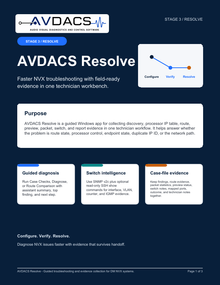
AVDACS Resolve is a guided Windows app for collecting discovery, processor IP table, route,
preview, packet, switch, and report evidence in one technician workflow. It helps answer whether
the problem is route state, processor control, endpoint state, duplicate IP ID, or the network path.

Download "AVDACS NVX Resolve Brochure.pdf"